neuron Carrier Experience API
home
Welcome to Neuron’s Carrier Experience API
The Neuron Carrier Experience API gives carriers a seamless, secure, and real-time interface into Neuron’s digital trading platform.
This API streamlines the flow of submissions, quotes, and status updates—helping carriers respond faster, operate with clarity, and integrate at scale.
What This API Enables
The Carrier Experience API allows carriers to work directly with submission and quote data, automate decisioning, and stay tightly connected to broker activity.
Core Capabilities
- Quote Management – Create, update, and deliver insurance quotes with full control over pricing and terms.
- Submission Tracking – Access detailed submission data and track the complete lifecycle from start to finish.
- Status Updates – Send real-time status events (Received → Assigned → Processing → Success) to keep brokers updated.
- Carrier Integration – Connect directly to Neuron’s ecosystem with robust, enterprise-grade security.
- Real-time Notifications – Ensure brokers receive immediate updates for faster decisions.
Business Use Cases
Neuron Quote Processing Activity Flow
Key Rules
- Key reference =
OptionId— Document upload and Quote submission shall be done onOptionId. - 📄 Documents are optional for a quote response; validation (scanning) is mandatory when documents are uploaded.
- 📬 Quote Submission = confirmation to send (and processed documents) to a broker.
- 🚫 If no documents are uploaded for an
OptionId, validation will still pass and allow quote submission. - ✅ If documents are uploaded, they must pass validation before the quote is accepted.
- 🆔 QuoteId and Quote Version will be generated upon successful quote submission.
- 📦 Quotes can be submitted one-by-one or in bulk (one or many
OptionIdper response).
Steps
1️⃣ Select OptionId from a received submission
- 🏢 Carrier: Choose the specific
OptionIdto work on.
2️⃣ (Optional) Upload documents (per OptionId)
- 🏢 Carrier → 📄 Document EAPI: Upload any supporting documents for the chosen
OptionId. - 📤 Outcome: Immediate confirmation with document IDs (files are queued for processing).
- ℹ️ Note: If the carrier chooses not to upload any documents, this step is skipped.
3️⃣ (Optional) Check document status
- 🏢 Carrier → 📄 Document EAPI: Get the processing status for the
OptionId’s documents. - 🔄 Possible statuses:
- Accepted (uploaded)
- Available (processed)
- ✔️ Only relevant if documents were uploaded.
4️⃣ Submit quote (per OptionId)
- 🏢 Carrier → 🚀 Carrier EAPI: Post the quote request for that
OptionId. - 🎯 Trigger: Neuron applies the validation gate before deciding acceptance.
5️⃣ Validation gate — Neuron
Neuron checks for this OptionId:
- 📌 If no documents uploaded → data validation is performed.
- 📌 If documents uploaded → they must be validated (all required docs present, successfully processed, integrity checks passed).
Outcomes:
- ❌ If failed: Neuron rejects the submission for this
OptionId. - ⏳ If documents are still processing: Neuron responds with a corresponding message for this
OptionId. - ✅ If passed: Neuron accepts the submission and performs data validation.
6️⃣a) If accepted
- 🔗 Neuron: Enriches the quote with document metadata (if documents were uploaded).
- 📤 Neuron → Broker: Sends the enriched quote for this
OptionIdto the broker. - 📥 Neuron → Carrier: Returns Quote Response with:
- Generated QuoteId
- Version
- Document metadata of processed attachments
6️⃣b) If rejected
- ❌ Neuron → Carrier: Returns Quote Response (OptionId): Rejected with clear reasons (e.g., validation failed, auth failed).
- 🔧 Carrier: Fix issues (upload or correct docs), then resubmit the quote for this
OptionId.
📤 Quote Submission Flow
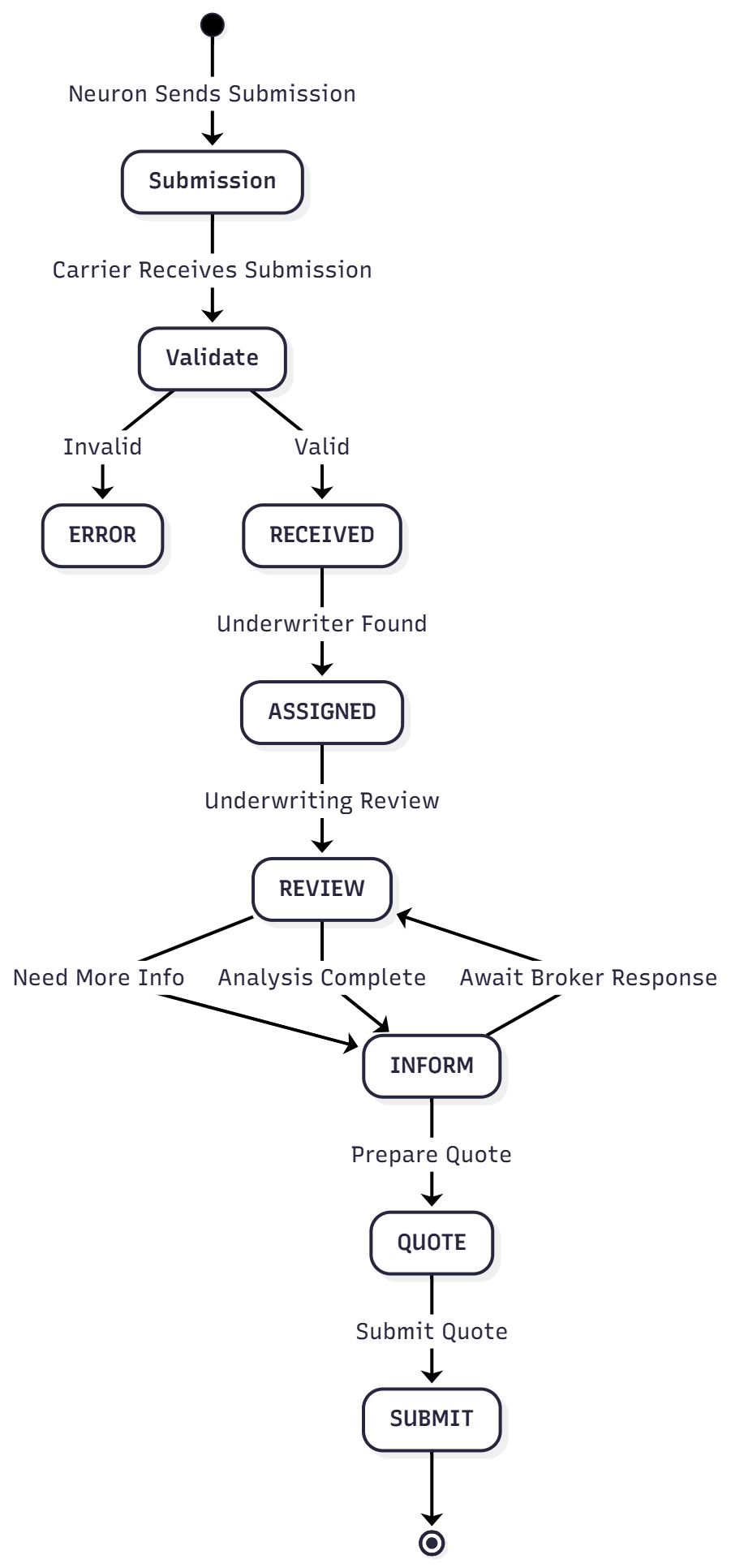
📡 Status Update Flow
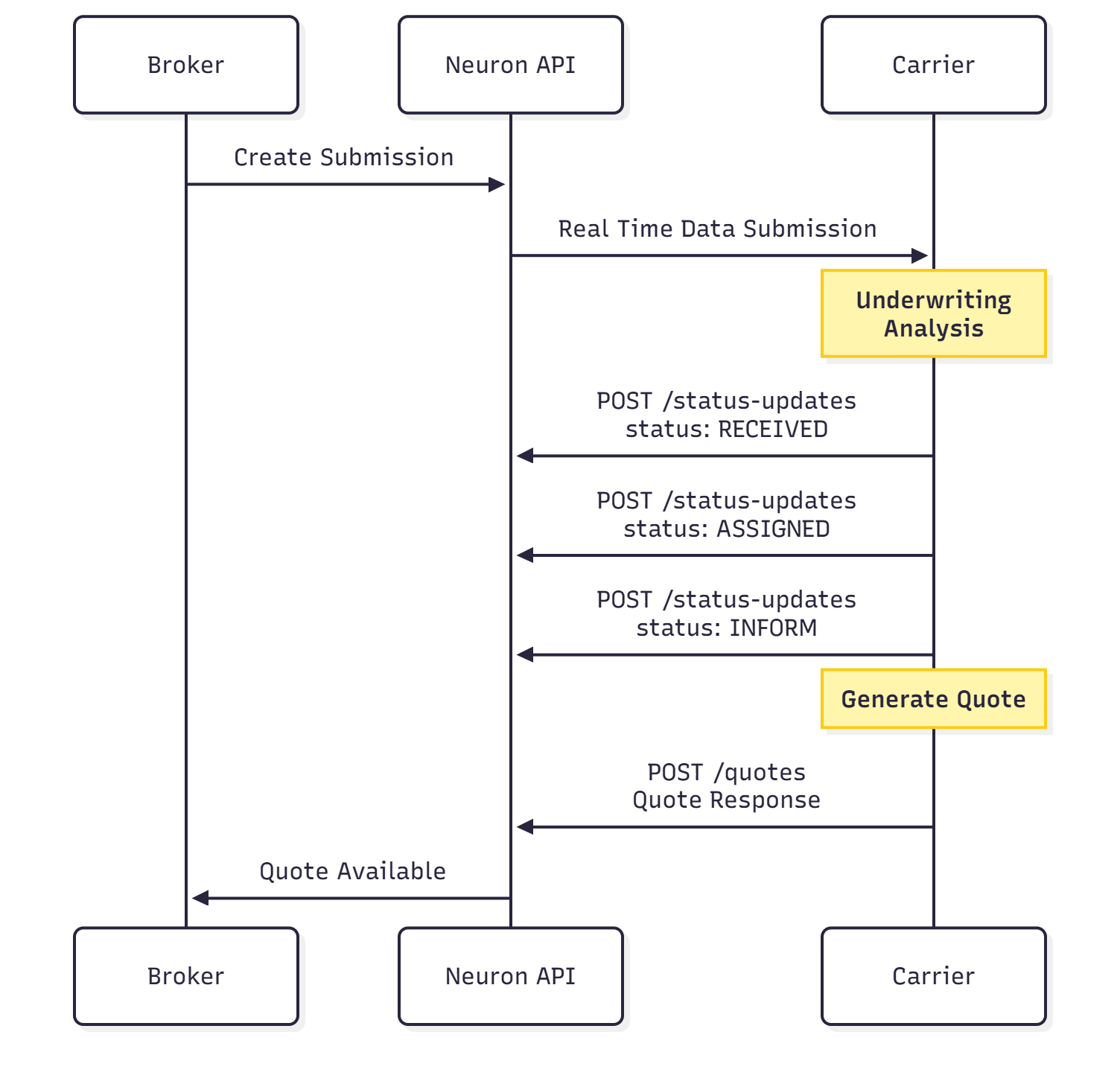
🛣️ Quote Lifecycle
Submitted → Received → Assigned → Underwriting → Quote Ready → Quoted / DeclinedTechnical Features
- RESTful JSON/HTTP APIs
- JWT authentication with client credentials
- Client ID enforcement
- Consistent error response models with correlation IDs
- Rate limits and usage governance
- Multi-environment support (UAT & Production)
Next Steps
- 👉 Review the full Getting Started Guide
- 👉 Explore the API Reference
- 👉 or directly jump on Try-it Playground