neuron Carrier Experience API
a7o-jwk/Authentication 🔐
Secure access to the Neuron Carrier Experience API is enforced through industry-standard mechanisms, including JWT (OAuth 2.0) and Client ID enforcement.
This page explains how these methods work together to ensure confidentiality, integrity, and controlled access across all environments.
🛡️ Overview
Neuron enforces a strict security model to protect all API interactions.
Every request must:
- Use TLS 1.2 or higher
- Include a valid JWT access token
- Include the assigned client_id
These controls ensure only authorised carrier systems can access Neuron’s digital trading platform.
🔑 JWT Validation (OAuth 2.0)
The API uses OAuth 2.0 with JWT bearer tokens issued by Azure Active Directory.
All authenticated requests must include:
Authorization: Bearer <access_token>
client_id: <your-client-id>
🧭 Identity Provider
Neuron integrates with Azure Active Directory (Azure AD) using a multi-tenant application model, allowing secure token issuance and centralised identity governance.
📜 Token Validation Rules
Each JWT is validated by the Neuron API Gateway before processing. The gateway checks:
| Claim / Attribute | Requirement | Purpose |
|---|---|---|
aud | Must match the configured audience | Ensures token is intended for Neuron |
roles | Must include required permissions | Grants role-based access |
tenantId | Must match onboarding configuration | Validates organisational identity |
exp | Must be unexpired (≤ 60 min) | Prevents replay or misuse |
| Signature | Must match Azure AD JWKS | Confirms token integrity |
Invalid tokens result in a 401 Unauthorized response.
🔁 JWT Validation Flow
Below is the high-level flow for token retrieval, validation, and downstream API invocation:
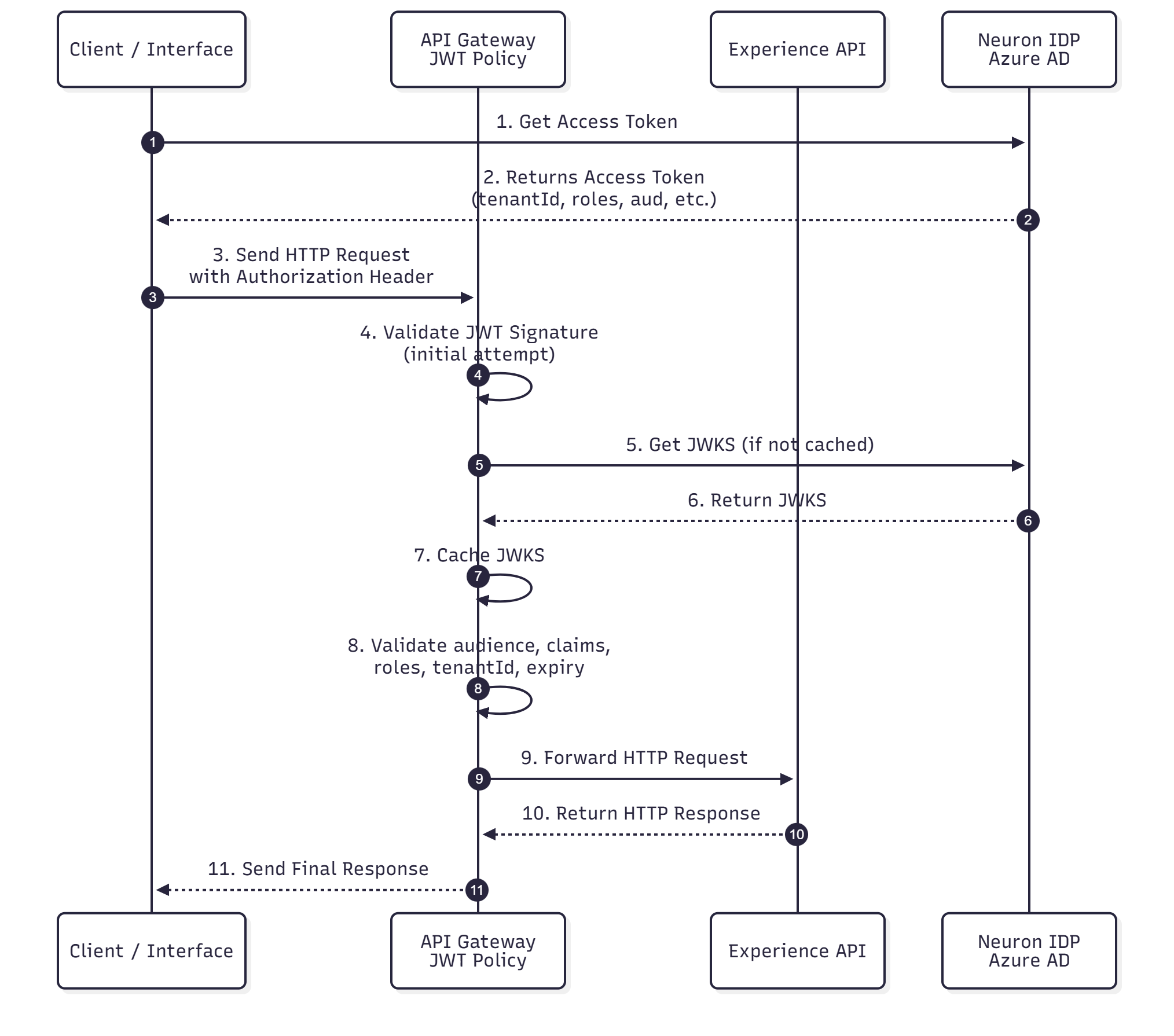
This flow ensures that every incoming request is authenticated, verified against Azure AD, and processed only when fully valid.
🧵 Accessing JWT Credentials
To obtain JWT access for your application:
- Contact the Neuron Operations & Support Team
- Provide your organisation details, environment requirements, and intended usage
- You will receive client onboarding instructions and the required configuration values
Support Contact:
🔗 Useful Navigation
Use the links below to move quickly between key documentation pages: